
How to tag support conversations and hand them over with context
Tagging best practices for chat support: topics from your own list plus intent, sentiment and outcome, and a short AI summary when a teammate takes over a chat.
Product pages: Handoff routing, Sentiment, summaries and tags

A conversation gets handed to you at 4:35 in the afternoon. It is forty messages long, half of them about tracking numbers. Somewhere in there is the reason the customer is upset. You can scroll and read, or you can ask them to explain again, which is the one thing they did not want to do.
AI conversation summaries and topic tags exist so that nobody has to choose between those two. The person picking up a conversation should understand it in five seconds.
What should a handoff summary include?
Summaries are short on purpose. They say what the customer wanted and where things stand, in a sentence or two:
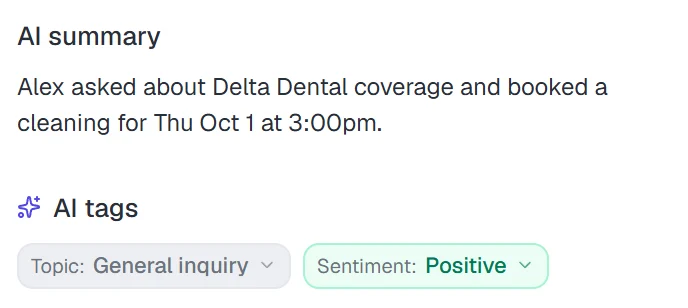
They are generated at the moments a person needs them: when a teammate takes over, when the conversation is assigned, and when it is closed. Before that, the summary section reads "A summary will appear once the conversation has a few messages."
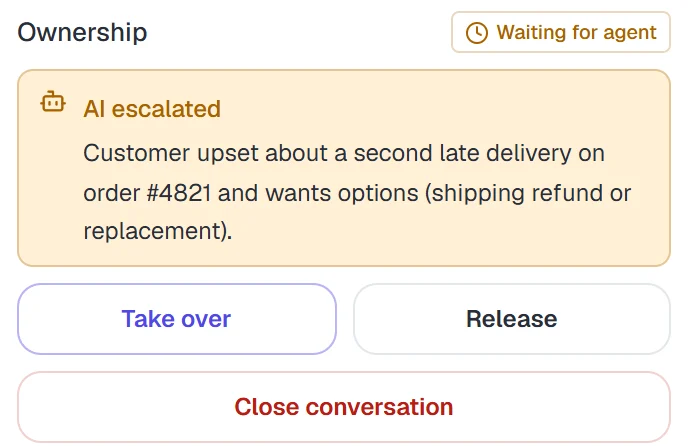
When the AI itself escalates, the panel also shows an "AI escalated" note with its reason in plain words, so the person taking over knows why they were called in, not just what was said.
Which tags should every support conversation have?
Each conversation gets four kinds of tag:
| Tag | What it holds | Example |
|---|---|---|
| Topic | One to five topics from your list | Order status, Returns |
| Intent | Support, sales, complaint, inquiry or informational | Complaint |
| Sentiment | Positive, confused, frustrated or angry | Frustrated |
| Disposition | Resolved, unresolved, escalated, awaiting customer or abandoned | Escalated |
You set up the topic list once under Settings, Topics. Keeping the AI to your list matters more than it sounds. Free-form tagging tends to produce "Shipping", "Delivery", "delivery delay" and "Late order" for the same thing, which makes any report useless. In Risolva, if the AI comes across something that does not fit, it adds it to a Suggestions queue. An admin can promote it to a real topic or ignore it.
What can you do with consistent conversation tags?
Tags are not decoration. Three parts of Risolva read them.
The shared inbox filters by topic and status, so a billing specialist can open "All topics: Billing" and see only their work.
Handoff rules use them as conditions. A rule like "Topic any of billing, routes to Front desk" is one of the handoff rules built on the same topics. See the handoff playbook for how rules are set up.
Lead scoring uses topic, intent and sentiment to work out what each contact is interested in, and turns that into a lead score for each contact. Our post on AI lead qualification explains the math.
A handoff with and without context
Here is the same moment two ways. Without a summary, the person who takes over starts from zero:
 Fernwood HomeWeb chat · example conversation
With a summary waiting in the panel, the reply writes itself:
Fernwood HomeWeb chat · example conversationAI summary: wrong size delivered on order #5132 (8 in, ordered 12 in), second wrong item, wants an exchange.
What summaries are not
Summaries are written at handoff, assignment and close, not continuously. If you open a conversation the AI is still handling happily, you read the thread itself. Behind the scenes the assistant keeps its own rolling memory of long conversations so it does not lose track, but that is for the AI, not a report for your team.
Small details, but they add up: fewer customers repeating themselves, faster first replies after a handoff, and reports built on tags you can trust. If you would like to see it on your own conversations, book a demo.
Frequently asked questions
When does Risolva create a conversation summary?
A short AI summary of one or two sentences is generated when a teammate takes over a conversation, when it is assigned to someone, and when it is closed. It appears in the AI summary section of the conversation panel.
What does auto-tagging add to each conversation?
One to five topics from your own topic list, plus intent, sentiment and a disposition such as resolved, unresolved, escalated, awaiting customer or abandoned.
Can the AI invent new topics?
No. Topics come from the list you set up in Settings. When the AI sees something that does not fit, it goes into a Suggestions queue, and an admin decides whether to add it.
Can agents change the tags?
Yes. Any tag can be changed or dismissed from the conversation panel, and hovering a tag shows how confident the AI was. A tag set by a person is not overwritten by the AI.
How many tags should a support team use?
Fewer than you think: a short topic list in your own words, plus a few fixed fields such as intent, sentiment and outcome. In Risolva each conversation gets one to five topics from your list, and new ones go to a suggestions queue instead of appearing on their own.
Why do customers have to repeat themselves after a transfer?
Usually because the person taking over sees the last message, not the story. A one or two sentence summary of what the customer wants and what was tried, next to the full thread, fixes most of it. Risolva writes that summary at takeover, assignment and close.