
How to set up an AI chatbot for WhatsApp Business
Step by step: set up an AI chatbot on the WhatsApp Business API, from your number and the 24-hour window to its sources, handoff rules and a safe launch.
Product page: WhatsApp chatbot

A customer messages your business on WhatsApp at 10 at night: "Is the Sage planter back in stock?" If nobody answers until morning, there is a good chance they have bought it somewhere else by breakfast. Multiply that by every evening, weekend and busy Monday, and you can see why so many businesses want an AI chatbot on WhatsApp.
The catch is that a bad chatbot is worse than none. One that guesses, loops or traps people in menus annoys customers faster than a slow reply. This guide walks through a setup that avoids those problems, in the order that works best.
Which WhatsApp account do you need?
There are two products with "WhatsApp Business" in the name, and they are very different.
| WhatsApp Business app | WhatsApp Business Platform (API) | |
|---|---|---|
| Built for | One person on a phone | Software and teams |
| Automated AI replies | Quick replies and an away message only | Yes |
| Shared team inbox | No | Yes, through a provider |
| Handoff to a person | Manual | Rules-based, with full history |
To use the API you need a Meta Business account, a phone number for the business and a display name that matches your brand. Meta also asks businesses to follow its commerce and messaging policies, so read them once before you start.
What is the 24-hour window, and why does it matter?
When a customer messages you, you can send free-form replies for 24 hours from their last message. That window is where almost all support happens, and it is where an AI chatbot does most of its work.
Outside the window, a business can only start a conversation with a pre-approved message template, such as an order update or an appointment reminder. Templates are reviewed by Meta and priced by category and country. Since October 1, 2026, Meta also charges for messages inside the window once a number passes 1,000 free service messages in a month, and utility templates sent in the window are charged too. Prices change from time to time, so check Meta's current WhatsApp pricing rather than relying on a figure in a blog post, or estimate your monthly bill with our WhatsApp pricing calculator. The same templates are what WhatsApp broadcast messages use when you message a list of customers.
For a support chatbot, the practical rule is simple: answer quickly while the window is open, and do not design workflows that depend on messaging people later without a template.
What should a WhatsApp chatbot answer from?
An AI chatbot is only as good as the facts behind it. The biggest cause of bad answers is a bot that was never given the facts, so it fills the gap with something plausible.
Gather what your team already uses to answer questions, then train it on your website, policies and catalog:
- Website pages, especially FAQ, shipping, returns and contact pages
- Policy documents: refunds, warranties, booking rules, cancellation terms
- Your product or service catalog, with prices, options and availability
- The notes your team copies and pastes every day
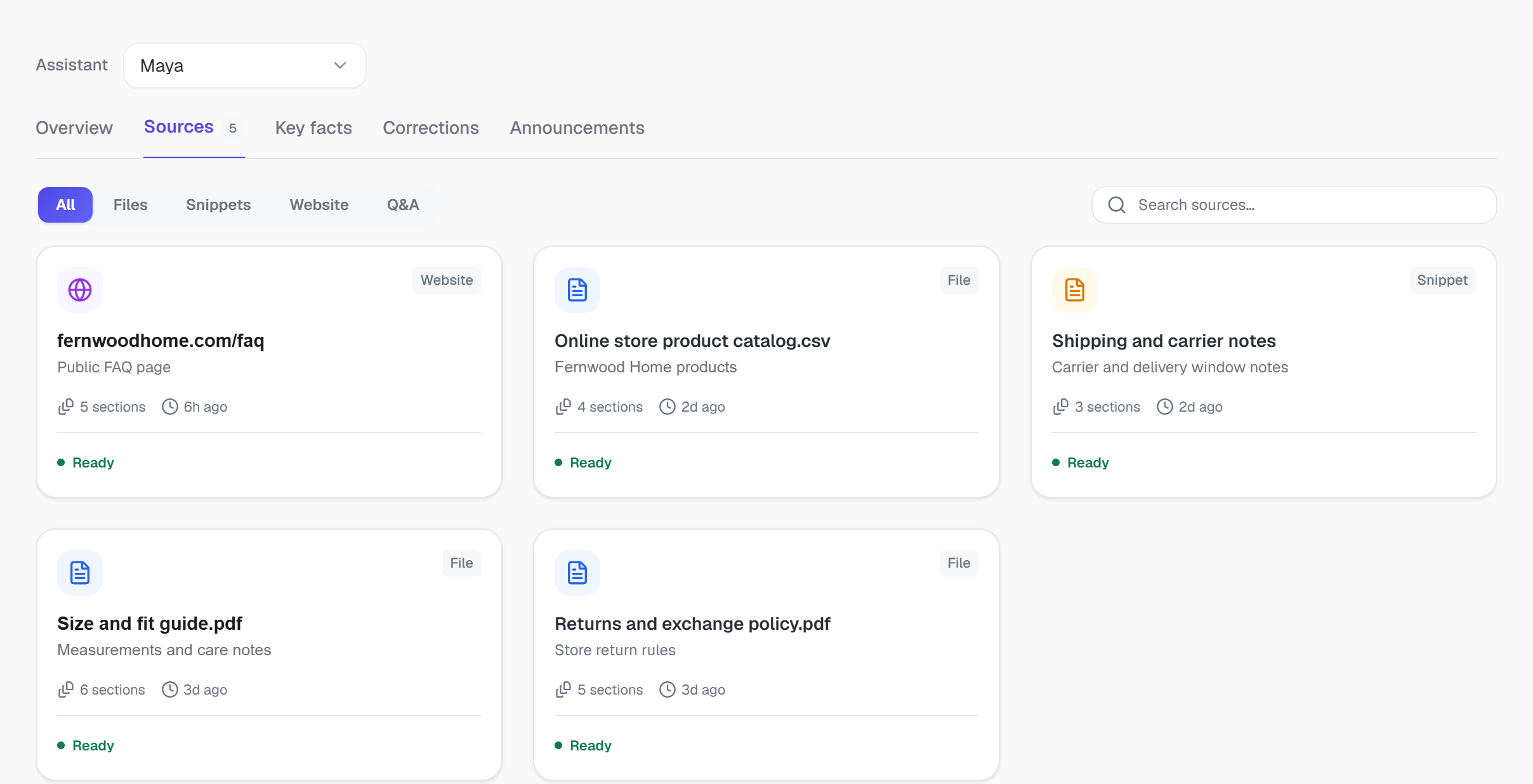
Then look for gaps and contradictions. If your website says returns are accepted within 30 days and an old PDF says 14, the bot will find both. Fix the source, not the bot, and decide which source wins when two overlap, for example "the website is always current".
Most importantly, make sure the bot answers only from these sources. When it cannot find an answer, the right response is to say so and bring in a person.
When should a person take over?
The second biggest cause of frustrated customers is a bot that will not let go. Before launch, write down when a person should take over. Most of these become handoff rules by topic, sentiment and business hours, and the AI escalates on its own when someone asks for a person or your sources don't cover a question:
- The customer asks for a person
- Money is in dispute: refunds, chargebacks, double charges
- The customer is upset, or the problem has happened before
- Anything sensitive for your industry
- The bot can't find the answer in your sources
Here is what a good handoff looks like from the customer's side:
 Fernwood HomeWhatsApp · example conversation
Handed to Dana R. · Complaints rule
Dana sees the whole thread and the order details, so Chris never has to repeat himself. Our handoff playbook goes deeper on rules and routing.
How do you test a WhatsApp chatbot before launch?
Before any customer sees the bot, test it with real questions:
- Collect 50 real questionsPull them from your recent WhatsApp history, including the awkward ones and a few voice notes and photos.
- Check every answer against the sourceCorrect, current and clearly worded.
- Try to break itA complaint, a refund dispute and a "can I speak to someone".
- Fix the sources, not the botMost wrong answers trace back to a missing or outdated document.
- Launch graduallyEvenings and weekends first, with someone watching the inbox for the first week.
Tell customers they are talking to an automated assistant and make it easy to reach a person. People are far more forgiving of a bot that is honest about what it is.
What should you measure after launch?
Keep an eye on a few numbers:
- First response time, which should drop to seconds
- Containment, the share of conversations resolved without a person
- Handoffs by reason, to spot topics that need a better source
- Sentiment, to catch frustration early
Review a sample of conversations every week for the first month. It is the fastest way to find the gaps in your sources. Wondering how much time this can save? See how AI chatbots save your team time.
The short version
A good WhatsApp AI chatbot is mostly preparation: the official API, clean and current sources, clear handoff rules and a careful launch. Get those right and the bot answers most routine questions in seconds, day or night, while your team handles the conversations that need judgment. If you want to see this on your own content, Risolva's WhatsApp chatbot is built around exactly this setup.
Frequently asked questions
Do I need the WhatsApp Business API for an AI chatbot?
Yes. The free WhatsApp Business app is built for a person on a phone. Automated replies, team inboxes and AI chatbots connect through the WhatsApp Business Platform, usually called the WhatsApp Business API.
Can I keep using my existing WhatsApp number?
Often yes. Ask your provider how they handle moving a number to the API. Some setups now let the same number keep working in the WhatsApp Business app alongside the API.
What is the 24-hour window on WhatsApp?
After a customer messages you, you can send free-form replies for 24 hours from their last message. Outside that window, a business can only start a conversation with a pre-approved message template.
How do I stop the chatbot giving wrong answers?
Restrict it to your own sources, keep those sources current, and set clear rules for handing over to a person whenever your sources don't cover a question.
Do WhatsApp chatbot replies cost money?
Meta's delivery charges can apply, the same as for messages your team sends. Template messages are priced by category and country. Since October 1, 2026, Meta also charges for replies inside the 24-hour window once a number passes 1,000 free service messages in a month, and utility templates sent inside the window are no longer free. Rates change, so check Meta's current rate card for your markets. On Risolva the AI itself is included in your plan, with no per-reply fee.
How long does WhatsApp Business API approval take?
Meta business verification is usually the longest wait. It often takes a few business days, but it can take a couple of weeks if Meta asks for more documents. Adding the chatbot's sources and writing handoff rules can happen in the meantime.