
AI agent

An AI agent for customer service that answers, acts or hands off

Customers get a straight answer or a finished task, like an exchange with its return label. Behind each reply, the AI customer service agent reads the thread so far and checks your policies, catalog or systems first.

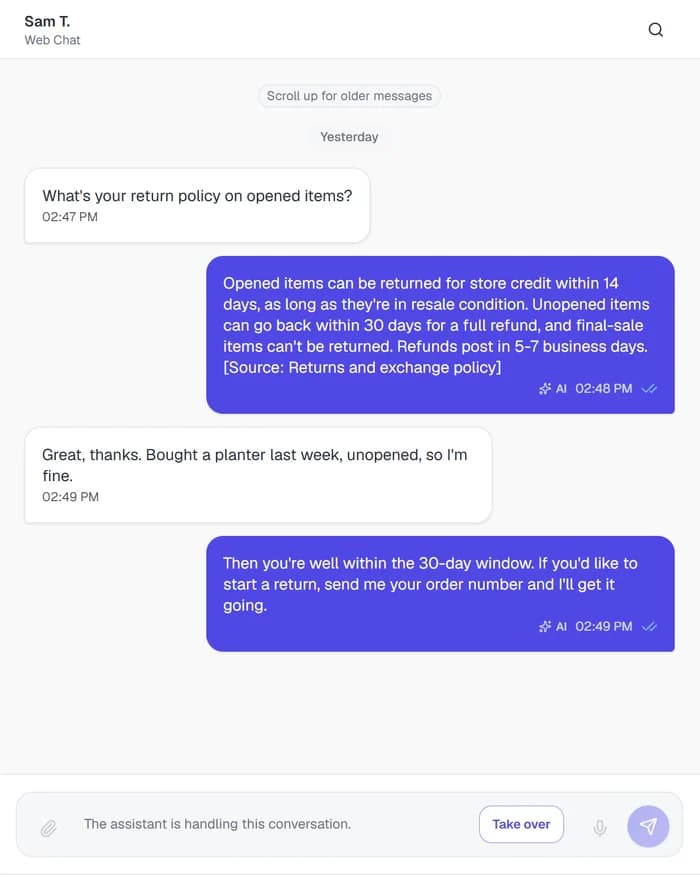
  • Can cite the policy it used, like [Source: Returns and exchange policy]
  • Counts, lists and groups catalog items from Key facts
  • Can ask the customer to confirm before an action runs
  • Persona and answer edits wait in a draft until you publish
A web chat reply about returns that cites the returns and exchange policy

Follow-ups are read in context

A reply like “yes,” “the bigger one” or “bought it last week, unopened” is read against what was just said. When one message asks two things, say the return window and a delivery time, the agent looks each one up separately and answers both, or says plainly which part it has no answer for.

Counts that come from your catalog

Questions like “how many styles do you carry?”, “list them all” or “what colors do they come in?” go to Key facts, the structured records Risolva pulls from your catalog and documents. The agent counts, pages through and groups those records by attributes like color or size instead of estimating from a few search results. Stock answers are as current as your last catalog sync.

It knows where its job ends

When your content has no answer, the agent says so instead of filling the gap. Requests unrelated to your business, like homework or trivia, get a polite no, and anything on your Prohibited topics list stays off the table even when asked directly. An unfamiliar product code still gets searched, because it might be one of yours.

How the AI agent takes action, from message to finished task

The agent can run several lookups or actions before it writes back. Here is a swap request, from the customer's first message to the return label landing in the chat.

  1. Read the message against the thread

    The agent sorts the message as a question, a request to do something, a greeting, small talk or something off-topic, notes the language, and reads it with the turns before it. Long conversations keep a running summary, so a detail from earlier still counts.

  2. Look up what it needs

    Policy questions go to a knowledge search, “how many” and “list all” questions go to Key facts, and anything that lives in your own system, such as an order, goes through a custom action. It can combine these in a single turn.

  3. Confirm, then act

    For a swap, the agent gathers what create_exchange needs, the order number and the new size, and asks “Shall I go ahead?” With Requires approval on, the action runs only after a yes, using exactly the details the customer confirmed. A file your system returns, like the return label PDF, goes back in the chat.

  4. Close the turn

    Each turn ends with one outcome: an answer built from what it found, a clarifying question, a plain “I don't have that information,” a polite decline, or a handoff to your team with the reason logged on the conversation.

Start an exchange
create_exchange
HTTP request
POSThttps://api.yourstore.com/orders/{{order_id}}/exchange
order_id string · requirednew_size string · required
Requires approvalThe AI will pause and ask the user to confirm before executing.
I can swap order #5132 for the 12 inch Sage planter. Shall I go ahead?
AI · 02:18 PM ✓✓
Yes please
02:18 PM
Done. Your exchange is booked and the return label is attached.
return-label-5132.pdf
AI · 02:19 PM ✓✓

The settings behind the AI support agent

Most of these live on the bot's Persona, Answers and Actions pages in the app. Test and Publish sit at the top of the bot.

AI agentIn the Risolva app
Bot type
Customer support, Sales assistant, FAQ / lookup, Internal assistant, Advisor or Minimal. Each sets how the agent converses before you fine-tune it.
Tone
Natural & conversational, Warm & friendly, Polished & professional, Upbeat & playful, or Formal & precise
Response length
Concise (about 500 characters), Standard (about 1,500) or Detailed (about 3,000)
Discovery style
Consultative (orients, then asks one focused question), Direct (minimal questions) or Off (answers only, never asks). Defaults to the bot type's choice.
Additional instructions and prohibited topics
Up to 2,000 characters of your own rules and up to 20 off-limits topics, layered under the safety and grounding rules
Answer style and citations
Expert or Source reader, plus the Cite knowledge sources in replies (off by default) and Link to source pages toggles
Per-action controls
When to use (the AI's cue to call the action), Requires approval, and Max calls per conversation (empty means unlimited)
Draft and publish
Covers persona, answer, model and handoff message settings. Test runs your saved draft in the playground, and Publish changes pushes it to every channel at once.
The full guide · 4 min readAI agent vs chatbot: what's different for customer supportKeyword bots, flowchart bots and AI agents all get called chatbots. How they differ in a real support chat, side by side, and how to tell which one you need.Read the guide

Before you put an AI customer service agent on your inbox

An AI agent for customer service is software that reads a customer's message, works out what it needs, and then answers, carries out a task, or passes the chat to a person. Risolva's agent searches your content, counts and lists catalog items, and calls your own systems through custom actions, on WhatsApp, Instagram, Messenger and web chat.

Try the agent on your hardest follow-ups

Book a demo with messages that only make sense in context, like a bare "yes", "the bigger one" or two questions in one line. We'll show what the agent looks up for each, where it would run an action, and where it would hand the chat to a person.