
When should a chatbot escalate to a human? A practical playbook
The triggers, routing and context that make an AI-to-human handoff feel natural to customers, plus a starter set of escalation rules you can copy for your team.
Product pages: Customer support, Website chat, Messenger chatbot, Handoff routing

Chris messages about a late order. The AI assistant shares the courier update. Chris replies: "That's two days late. Second time this has happened." This is the moment that decides whether Chris stays a customer.
If the bot keeps cheerfully repeating tracking details, Chris feels ignored. If it hands over to a queue nobody is watching, Chris waits. If it hands over without context, Chris has to explain everything again to a person. Get the handoff right, and Chris gets a quick, human apology and a fix.
What should trigger an escalation to a human?
Most good setups combine three kinds of rules.
1. The customer asks for a person
Give them one, without an argument. Phrases vary ("can I talk to someone", "real person please", "this isn't helping"), which is one reason AI assistants handle this better than keyword bots: they recognize the intent, not just the words.
2. The topic is one you never automate
Some subjects should always go to a person, whatever the AI knows:
- Money in dispute: refunds, chargebacks, double charges
- Repeat problems: a second late delivery, a fault that came back
- Sensitive matters: clinical questions at a clinic, a child's wellbeing at a school, anything legal
- High-value moments: price negotiation, large orders, enterprise inquiries
These are business decisions. Write them down as explicit rules rather than leaving them to the AI's judgment.
3. The AI cannot answer
Even on safe topics, the assistant will sometimes not find a clear answer in your material. The right move is to say so and bring in a person, not to guess. A well-built assistant does this on its own. In Risolva, the AI escalates when the customer asks for a person, stays frustrated after it has tried to help, or needs something it cannot do or answer, usually offering a teammate first. Your rules then decide who receives it.
What does a good handoff look like?
From the customer's side, it should feel like being passed to a colleague who already knows the story:
 Fernwood HomeWhatsApp · example conversation
Escalated to Dana R. · Complaints rule
Behind the scenes, Dana received everything she needed to act right away, including a short summary written when a teammate takes over:
- Full threadEvery message, not just the last one
- SummaryWhat Chris wants and what was tried
- ReasonComplaint, second late delivery
- DetailsOrder #4821, courier, expected date
- OwnerDana R., notified immediately
Who should receive the conversation?
"Send it to support" works on day one. As volume grows, routing matters:
- Complaints to whoever handles service recovery
- Billing questions to whoever can issue refunds
- Sales inquiries to a salesperson, with qualifying details already captured
- Out-of-hours handoffs to a queue picked up first thing
Order your rules as well. They are checked from the top, so put the specific ones (an angry VIP, a billing dispute) above the broad ones (anything on WhatsApp).
What is a good starter set of escalation rules?
If you are setting this up for the first time, this list is a sensible default to adapt:
| Rule | Goes to | Order |
|---|---|---|
| Angry or frustrated customer | Service lead | 1 |
| Refund, chargeback or billing dispute | Billing | 2 |
| Sensitive topic for your industry | Named specialist | 3 |
| Sales or pricing intent | Sales | 4 |
| Outside business hours | First-shift group | 5 |
| Anything else, including "asked for a person" | Support team | Fallback |
Setting up routing in Risolva
In Risolva, these chatbot to human handoff rules live in each bot's Handoff tab, which has two screens: Rules and Messages.
Rules
A rule has a name, a priority, one or more conditions, and a target. Rules are checked in priority order, top first, and the first match wins. If no rule matches, the escalation goes to everyone with the Agent role, so nothing is ever dropped.
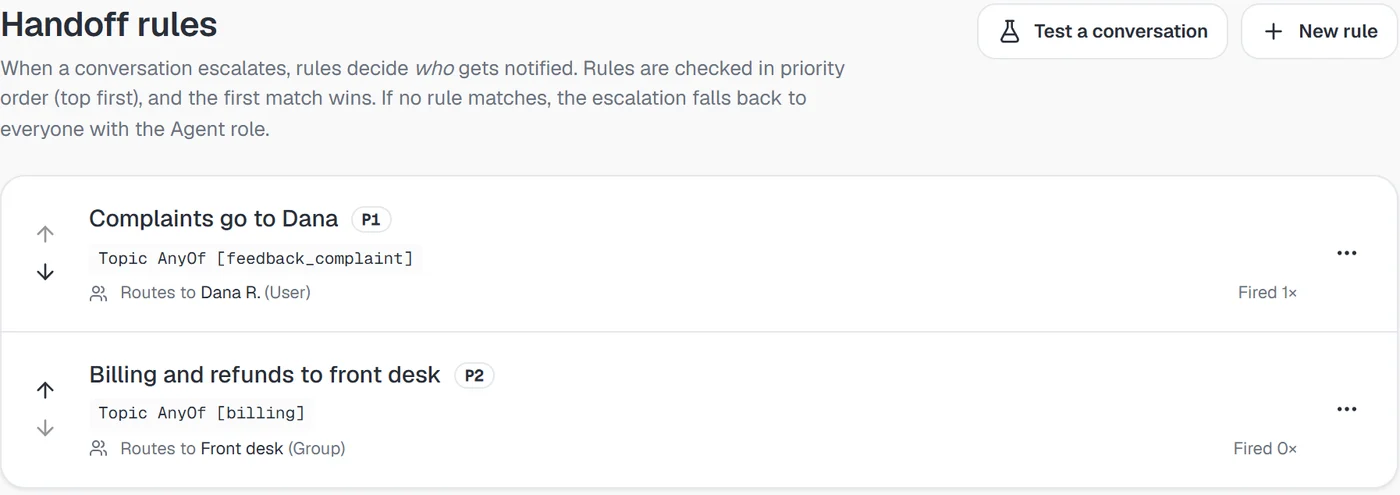
Conditions can be combined, and all of them must match for the rule to fire:
| Condition | Can check | Example |
|---|---|---|
| Topic | Equals, any of, none of | Topic any of [billing, refunds] |
| Sentiment | Equals, not equals, any of, none of | Sentiment any of [frustrated, angry] |
| Intent | Equals, not equals, any of, none of | Intent equals sales |
| VIP customer | Yes or no | VIP customer is yes |
| Channel | Equals, any of, none of | Channel any of [WhatsApp, Instagram] |
| Business hours | Yes or no | Business hours is no |
Sentiment, VIP, channel and business hours are checked in real time on every message. Topic and intent come from the conversation's tags, which refresh every few messages. Our post on sentiment detection covers the sentiment side in more depth.
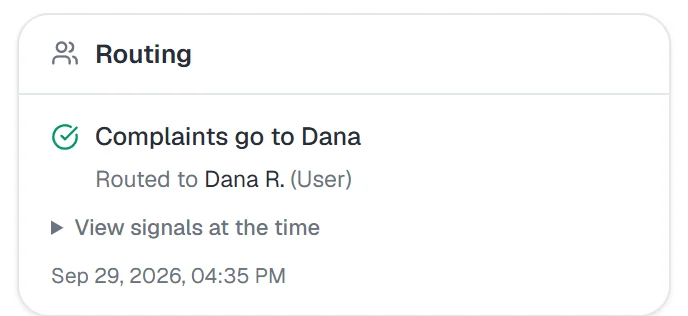
Each rule routes to either a specific user or an agent group. A group notifies all of its members, and whoever picks it up first takes it. The person gets a "Handoff routed to you" notification, and the conversation's panel shows which rule fired and when:
Before switching a rule on, use Test a conversation to run your rules against a real thread and see which one would fire. Every rule also shows how many times it has fired, which is the quickest way to spot one that never matches.
Messages
The Messages tab holds what the customer sees at each step. Each message can be switched off to stay silent, or reworded, with placeholders for the agent's name, the bot's name and your company name:
- Agent takeover, sent when a teammate takes over or is assigned
- Handed back to the bot, sent when a teammate returns the conversation to the assistant
- Awaiting a human, which the assistant weaves into its reply after it requests a person
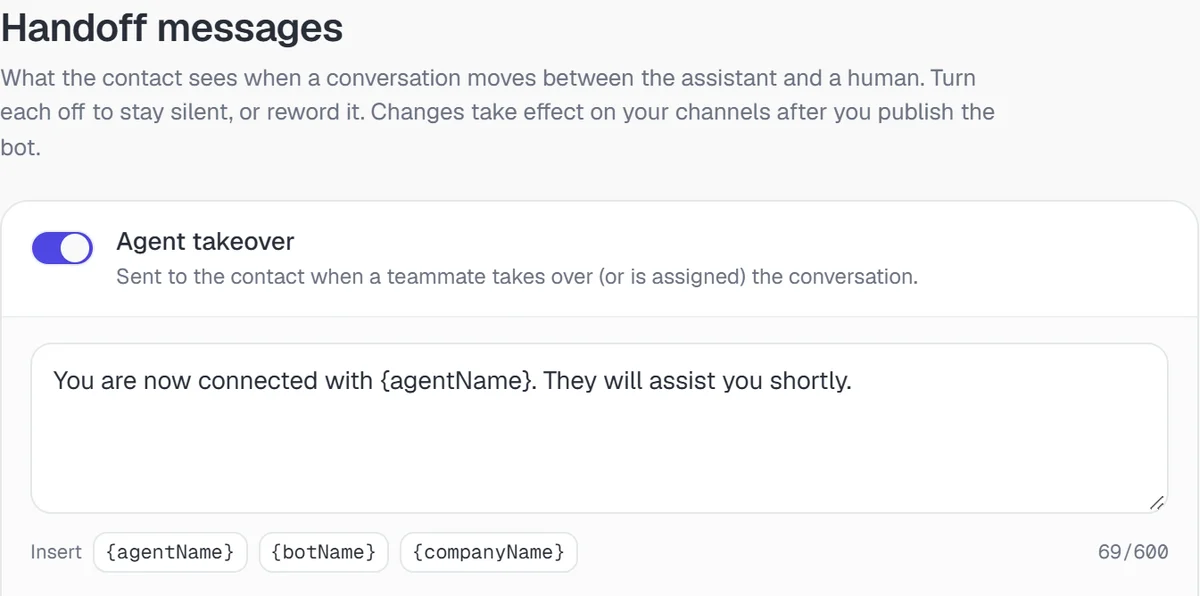
A rule can also carry its own handoff message, so a complaint and a sales inquiry can sound different. Changes go live on your channels when you publish the bot.
Can people take over without a rule firing?
They should be able to. Anyone on the team should be able to take over any conversation with one click when they can see it is time. The reverse matters too: once the tricky part is resolved, the person hands the conversation back to the assistant for routine follow-ups like delivery updates. A shared inbox that shows who owns each conversation makes the current owner obvious, so nobody replies twice.
How do you know your escalation rate is right?
Watch two numbers:
- Handoff rate by reason. Lots of "could not answer" handoffs point to gaps in your sources. Lots of "asked for a person" can mean the assistant is not being helpful enough.
- Time to first human reply after a handoff. Handing over quickly to a queue nobody watches just moves the wait. Keep this visible.
The principle behind it all
An AI assistant should handle what it does well and step aside for everything else. Clear rules, sensible routing and full context at the moment of handover are what make that work. When they are in place, customers barely notice the switch from AI to person, which is exactly the point. To see how handoff rules work across every channel in one inbox, have a look at Risolva's AI customer support. For the context that travels with each handoff, see conversation summaries and auto-tagging.
Frequently asked questions
When should a chatbot hand over to a human agent?
When the customer asks for a person, when the topic is one you never automate (refunds, complaints, sensitive matters), when the customer is clearly upset, and when the AI cannot answer from your own material.
What information should be passed to the human agent?
The full conversation thread, a short summary, the reason for the handoff, any details already collected such as an order number, and the customer's history.
What can handoff rules match on in Risolva?
Topic, sentiment, intent, VIP customer, channel and business hours. All conditions in a rule must match, rules are checked in priority order, and the first match decides who is notified.
Can the AI take a conversation back after a person has handled it?
In a good shared inbox, yes. The person resolves the tricky part and hands the conversation back for routine follow-ups, with the current owner always visible.
What is a warm handoff in chat support?
A handoff where the person taking over gets the full thread, the reason for the escalation and a short summary, and the customer is told someone is joining, so nobody repeats themselves. Risolva writes that summary when a teammate takes over or is assigned.
What should a customer see while waiting for a person?
A message saying a person is joining, ideally with a name. In Risolva each bot has editable takeover, hand-back and awaiting-a-human messages with placeholders for names, and a rule can carry its own handoff message.