
Knowledge and citations

Train an AI chatbot on your own data and keep it current

Prices, policies and pages change. Risolva rechecks your site on the schedule you set, holds big page rewrites until someone approves them, flags sources that contradict each other, and lets your team correct any AI reply right from the inbox.

  • Whole site, sitemap or chosen URLs, up to 200 pages
  • PDF, Word, text and image files, scanned pages too
  • Auto-recrawl daily, weekly or monthly
  • Inline source labels and links to the exact page
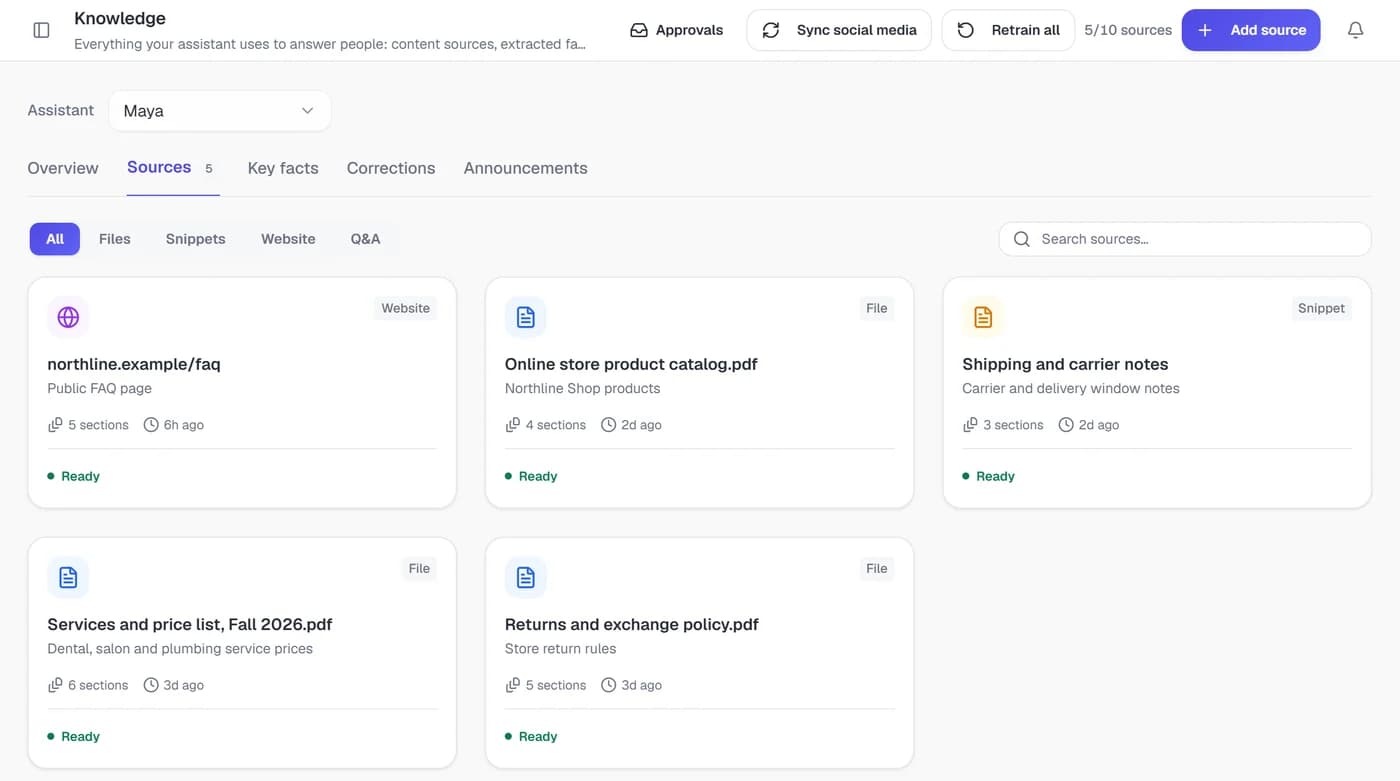
Knowledge sources: a website FAQ, a product catalog, shipping notes, a price list and a returns policy, all ready

Big rewrites wait for your approval

Files, snippets and Q&A pairs you write go live once trained. Website recrawls work differently. Small edits apply on their own, but when a recrawl changes a large share of a site, the new version waits in Approvals with old and new text side by side, and customers keep getting the current answer until someone approves it. Informative new Instagram posts wait there too.

Contradicting sources come to you to settle

After every source trains, Risolva compares it with the rest. Say Northline Shop's FAQ page still promises 30-day refunds on everything, while its Returns and exchange policy gives opened items store credit within 14 days. Both passages appear together, you choose which is right, and only the conflicting statement is removed from the other source.

Wrong answers get fixed from the inbox

Say the assistant tells a Northline Shop customer that an opened walnut serving board only qualifies for store credit, when it actually arrived cracked. A teammate clicks Correct this answer, writes that damaged items are replaced at no charge, and adds the reason. The correction is trained like any other source and covers similar questions from then on.

From first website crawl to an answer with a citation

Two screens do the work: Knowledge, where sources are added and trained, and the bot's Answers settings, where you decide whether replies carry a source label and a page link.

  1. Pick the pages worth training on

    Enter your site and choose Scan entire site, Use sitemap only or Specific URLs only, with paths to include or skip. Risolva reads robots.txt, groups the pages it finds by pattern and ranks their training value, leaving cart, checkout and login pages unticked. Preview the extracted text from up to three sample pages before training starts.

  2. Add what isn't on your website

    Upload PDFs, Word files, text files or photos of printed material, such as a laminated price sheet. For short facts, write a snippet, or a list of Q&A pairs where one answer covers several ways of asking. Each source card shows its sections, when it last trained and a Ready status.

  3. Decide how answers show their source

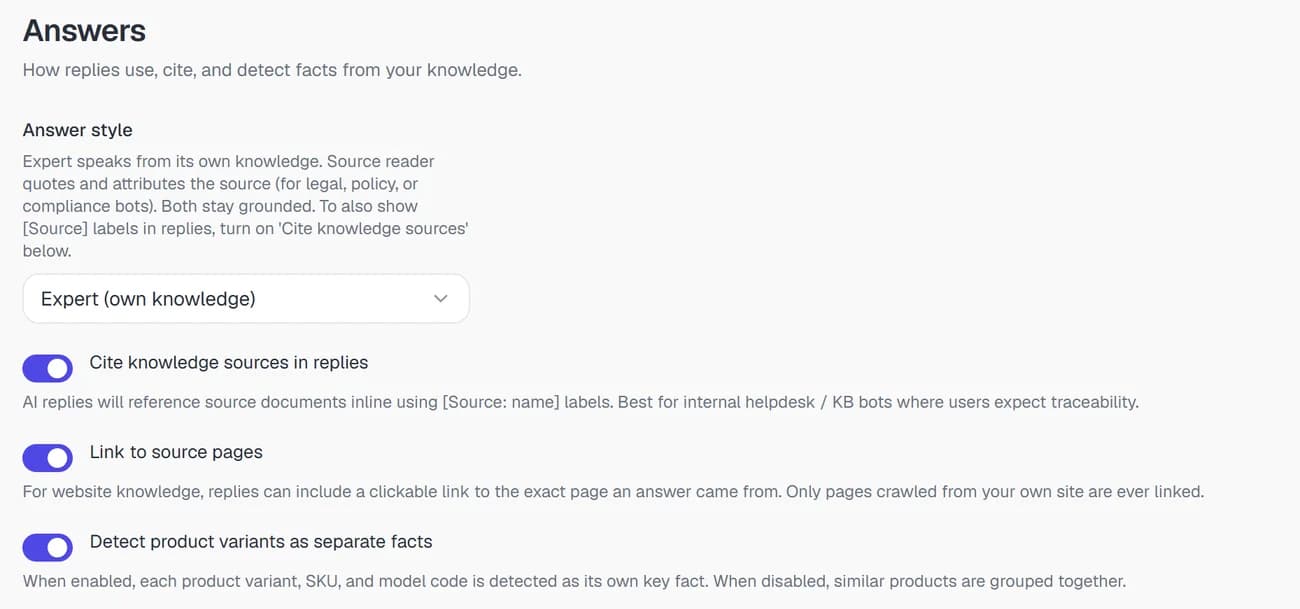
    In the bot's Answers settings, Cite knowledge sources in replies adds an inline source label to each answer, and Link to source pages lets website answers link to the page they came from. Answer style switches between Expert, which speaks from the content, and Source reader, which quotes and attributes it for policy-heavy bots.

  4. Put upkeep on a schedule

    Set auto-recrawl to Daily, Weekly or Monthly so page changes are picked up, and use Retrain all after a big content update. The Overview flags any source not retrained in 30 days, and the Approvals button shows a count whenever changes are waiting.

Answer settings with Cite knowledge sources in replies and Link to source pages switched on

Sources you can train on, and how changes are checked

Labels and limits as they appear in the Knowledge screens and the bot's Answers settings.

Knowledge and citationsIn the Risolva app
Source types
Website, Upload a file, Text snippet and Q&A pairs, where one answer can carry several question phrasings. Instagram posts are added as sources once approved.
File uploads
PDF (scanned pages included), DOCX, TXT, PNG, JPG and WEBP. The per-file size limit depends on your plan. Extracted text can be edited and saved as an edited copy, then retrained, without re-uploading. CSV and spreadsheet files aren't accepted.
Website crawl
Scan entire site, Use sitemap only or Specific URLs only, with include and exclude paths and a preview of up to three sample pages. Up to 200 pages per website source. Respects robots.txt; cart, checkout and login pages are usually unticked for you.
Auto-recrawl
Manual only, Daily, Weekly or Monthly. Each run compares every page with the trained version and keeps the existing training when nothing changed. Any single page can be recrawled or excluded from the source's Pages list, and exclusions hold on later recrawls.
Approvals
Holds large website changes and informative new Instagram posts (fetched every few hours). Items are marked New, Updated, Removed or Edited, page changes show the previous and new text, and nothing goes live until Approve. Reject keeps the current version.
Conflict detection
Runs after each source trains. Keep either source, Keep both or Dismiss, or keep one source across every disagreement between the same two sources. Keeping one removes only the conflicting statement from the other.
Answer corrections
Correct this answer on any AI reply in the inbox, with Customer question, Preferred answer and Why are you changing it? fields. Edit, disable or delete them under Knowledge > Corrections.
Citations
Cite knowledge sources in replies (off by default) adds an inline source label. Link to source pages (on by default) lets website answers link to the exact page, only ever on your own crawled site.
The full guide · 4 min readHow to prevent AI hallucinations in customer supportWhy support AI makes things up, how grounded answers with cited sources prevent it, and what to check before you trust an AI tool with customer questions.Read the guide

Before you train a chatbot on your own data

Yes. Upload PDF, Word (.docx), plain text and image files (PNG, JPG and WEBP) alongside your website, with a per-file size limit set by your plan. PDFs are read page by page, so scanned price lists and tables come through. If text is misread, edit it, save it as an edited copy and retrain, without uploading the file again.

Bring a URL and a policy PDF

Book a demo and we'll walk through the crawl, the Approvals queue, conflict checks and source-linked answers on content like yours. Risolva is in private beta, so setup is guided by our team.