
Shared inbox

One shared inbox for WhatsApp and Instagram, one owner per chat

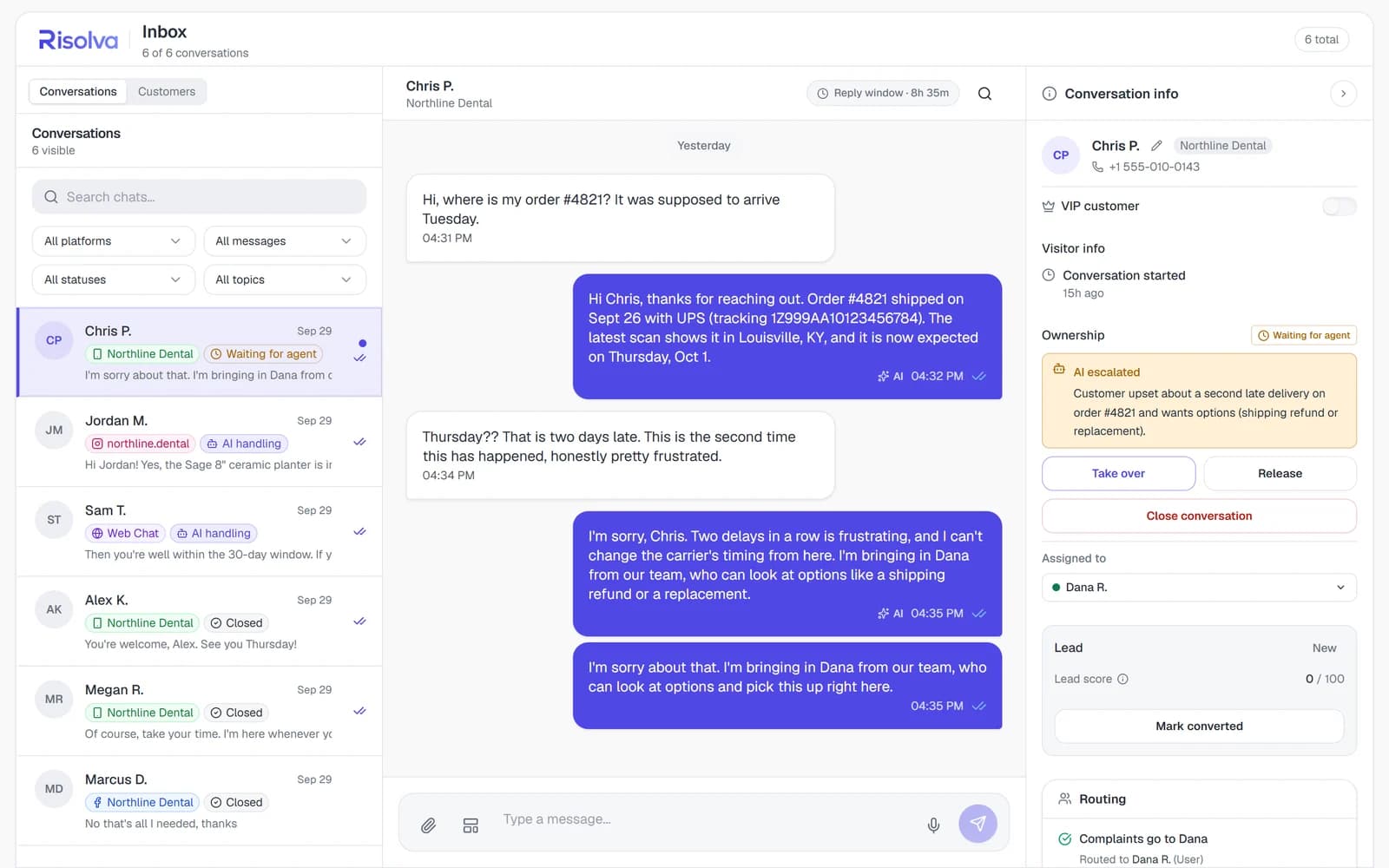
A WhatsApp shared inbox, with Instagram, Messenger and website chats in the same list the whole team can see. Rows show the channel and status, and an open chat shows who owns it and how long its reply window has left.

  • Filter by channel, status, topic or unread
  • Take over, Release and Close from the details panel
  • Reply window countdown on WhatsApp, Instagram and Messenger
  • Push alerts for escalations and new assignments
Risolva inbox with conversations from WhatsApp, Instagram, Messenger and web chat, one waiting for an agent

Taking a chat locks it to you

Once a teammate takes over a conversation, it is theirs. Other agents can still read it, but replying, releasing and closing are locked to the owner and to admins, and only an admin can hand it to someone else. While the AI is handling a chat, the composer stays locked with a note to take over first.

The 24-hour clock sits in the header

WhatsApp, Instagram and Messenger allow free-form replies for 24 hours after the customer's last message. Each of those chats shows a Reply window countdown that turns amber in the final hour. When a WhatsApp window closes, the composer offers Send template with your approved templates. Web chat has no window, so it shows no timer.

Notes, tags and a summary before the first word

The details panel beside every thread shows why the chat was escalated, which routing rule matched, topic and sentiment tags, your team's notes and a VIP flag. Taking over adds a short AI summary, and web chats add the page the visitor was on. Once a chat is yours, Generate AI reply draft suggests an answer you can edit before sending.

Chris P.'s late order, from escalation to hand-back

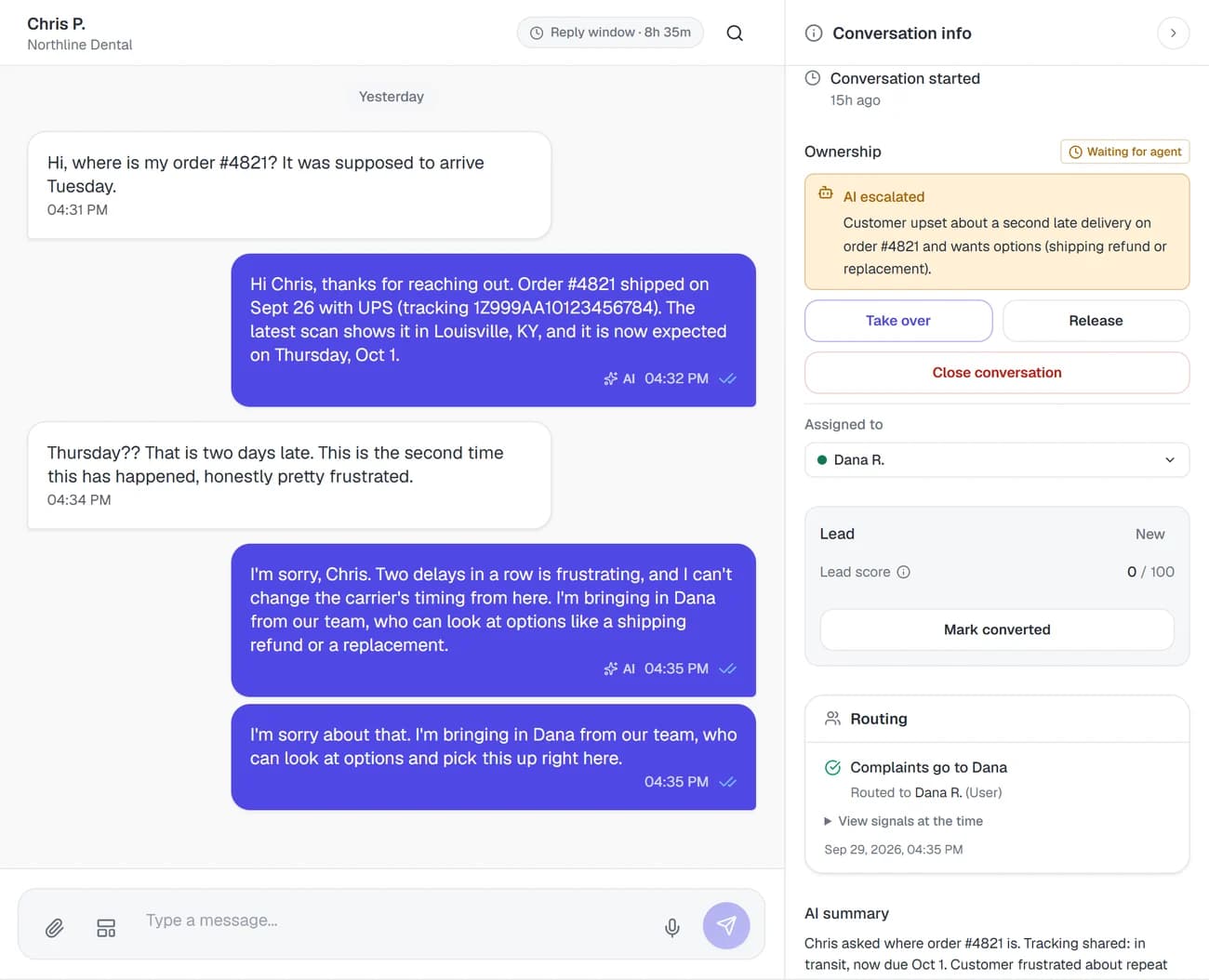
One Northline conversation, the same one in the screenshot, as it moves through the inbox.

  1. The chat escalates and a rule routes it

    Chris messages on WhatsApp about order #4821, which is running late for the second time. When he says he is frustrated, the chat escalates and the rule “Complaints go to Dana” routes it to Dana R. The row shows Waiting for agent, Dana gets a notification, and the AI keeps answering Chris until someone takes over.

  2. Dana reads the panel first

    The details panel shows the escalation reason (a second late delivery, wants a shipping refund or a replacement), the Routing card naming the rule that fired, and a frustrated sentiment tag. She knows what went wrong and why it came to her before she scrolls back through the thread.

  3. One click on Take over

    The chat is assigned to Dana, the status changes to Human assigned, the AI stops replying, and Chris gets the takeover message you set. An AI summary of the thread lands in the panel. Dana offers a shipping refund or a replacement in her own words, or starts from an AI reply draft and edits it.

  4. Release it or close it

    Release hands the chat back to the AI with your hand-back message, so Chris can keep asking about delivery. Close conversation ends it, clears the owner and writes a final summary. If Chris writes again within a week, the same conversation reopens with the AI handling it and the history intact.

Chris P.'s WhatsApp thread waiting for an agent, with the AI's escalation reason, the assignee and the routing rule that matched in the details panel

What the inbox shows, and who can change it

Labels, filters and permissions as they appear in the app.

Shared inboxIn the Risolva app
Statuses
AI handling, Waiting for agent (escalated, not taken over yet), Human assigned and Closed, shown on each row and in the status filter
Filters and search
All platforms or one connected channel, All messages or Unread only, handling status, and topic from your own topic list. Search matches a customer's name, phone number or the conversation summary.
Ownership controls
Take over, Release and Close conversation in the details panel, plus an Assigned to picker for admins. Once a chat is assigned, only that person or an admin can reply, release or close it.
Roles
Default roles. Admin: everything, including assigning a chat to another teammate. Agent: replies, takes over unassigned chats, adds notes and tags, marks VIPs. Viewer: read-only.
Reply window
Countdown on WhatsApp, Instagram and Messenger chats, amber in the last hour. A closed WhatsApp window needs an approved template, sent with Send template. Web chat has no window.
Details panel
Ownership, Routing, AI summary (written on takeover, assignment or close), AI tags (topic, sentiment, disposition and intent), your own tags, notes and the VIP flag. Web chats add Visitor info and the visitor's page.
Opt-outs
A customer who sends STOP, UNSUBSCRIBE, OPT OUT, OPT-OUT or STOP ALL gets an Opted out card, and the composer locks on that channel until they send START or a teammate re-opts them in with a logged justification note.
On a phone
The list and the chat each get their own screen, the details panel slides in from the side, and a Conversations and Customers switch sits above the list. Push alerts cover AI escalations, assignments and messages on chats you own, and each alert type can be switched off.
The full guide · 4 min readHow a small team can handle WhatsApp, Instagram and web chatHow a small team can cover WhatsApp, Instagram, Messenger and website chat without burning out: one inbox, one owner per chat and automation for repeat questions.Read the guide

What teams ask before sharing a WhatsApp inbox

A shared inbox for WhatsApp and Instagram is one list where WhatsApp messages and Instagram DMs arrive side by side, so several teammates can work them without passing a phone around. In Risolva the same list also takes Facebook Messenger and web chat. Every row shows its channel and status, and once someone takes a chat over, it has a single owner.

Bring your channels into one inbox

Book a demo and we'll walk you through the inbox your team would work from, from takeover and routing to the phone layout, and plan how your channels get connected.