
Chatbot to human handoff

Chat routing rules that hand each chat to the right teammate

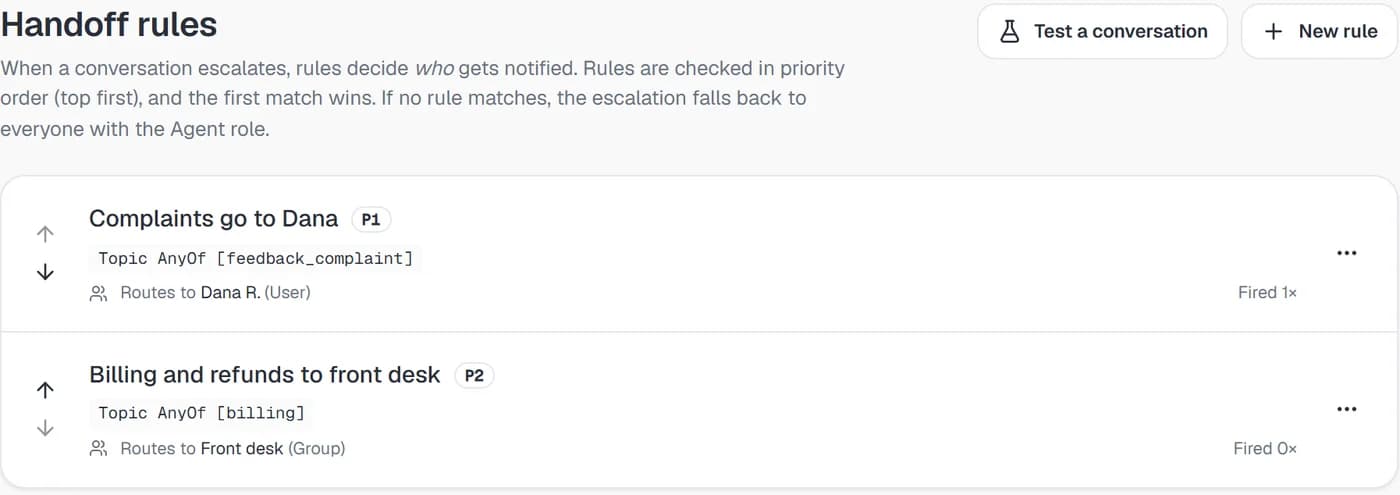
Write chat routing rules on topic, sentiment, intent, VIP status, channel and business hours, and each escalation goes to the person or group who should take it, with the matched rule shown on the conversation.

  • Six condition types, and all of a rule's conditions must match
  • Checked in priority order, and the first match wins
  • Route to one teammate or a whole agent group
  • Try your rules on a recent conversation first
Risolva handoff rules screen with two rules routed to a person and to a group
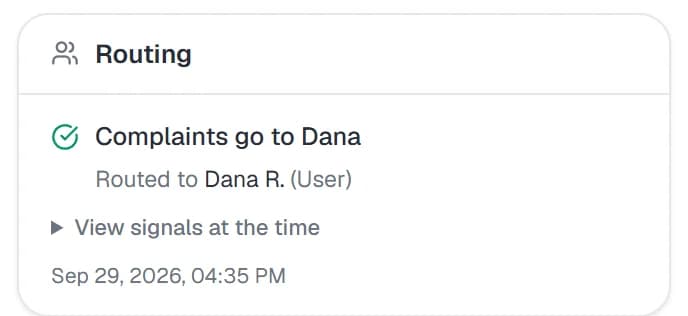
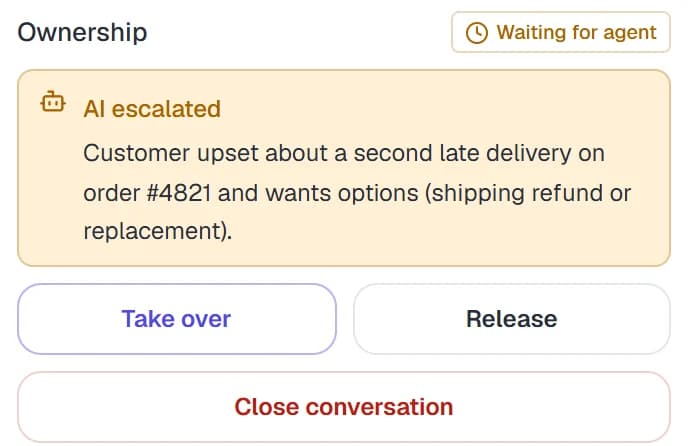
Routing card in a conversation showing the matched rule and who it was routed toAI escalated note explaining why the conversation was handed to a person

Rules act on the message itself

A rule with at least one condition is checked on every new message while the AI is handling a chat. When it matches, the conversation moves to Waiting for agent and the AI does not reply to that message. At the Larkspur Hotel, an example 64-room hotel, a rule of Sentiment equals Angry hands a guest who is furious about a $28 parking charge to the Front desk group, so the complaint never gets a cheerful automated reply.

When the AI escalates to a human, the same rules apply

When the AI decides a person should take a chat, for example because the guest asked for a manager, it records why, and the same rules decide which agents are notified. The reason shows on the conversation as an AI escalated note, so Dana R. knows the story before she reads the thread.

You can see why a chat went where it did

Each routed conversation carries a Routing card with the rule that matched, who it went to and the signals at that moment. The rules list shows how often each rule has fired and when it last did, and marks a rule whose teammate or group has been deactivated as Target inactive.

What the guest reads while the conversation changes hands

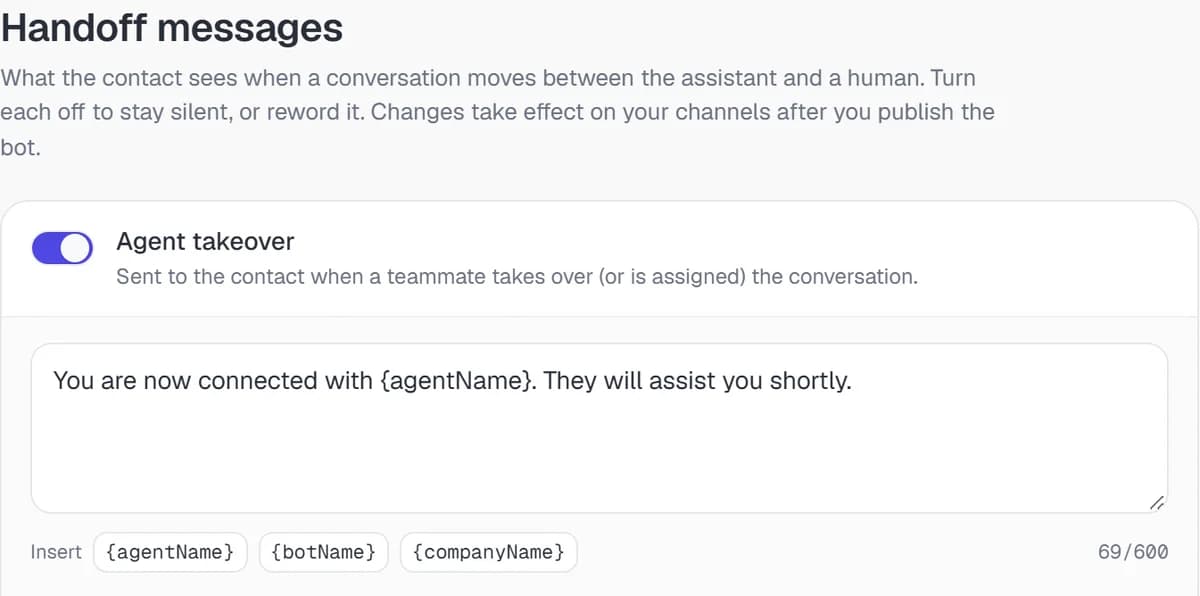
The Messages tab holds three lines a customer can see during a handoff. Each one can be reworded with tokens such as {botName} and {companyName} ({agentName} on the takeover line) or switched off, and changes go live when you publish the bot. Here is how a handoff reads at the Larkspur.

  1. The handoff starts, from a rule or from the AI

    A guest writes in, angry about a $40 late checkout fee. If a rule matches, the AI skips its reply and the guest gets that rule's own message, such as "I'm passing this to our front desk, who can see the charges on your room." If the AI raises the handoff itself, it works the Awaiting a human line into its reply instead.

  2. The AI keeps the guest company

    The chat now shows Waiting for agent in the shared inbox. The AI stays on and answers anything else the guest asks, like whether breakfast comes with a King room or what parking costs, so nobody sits in silence while the front desk finishes checking someone in.

  3. A teammate takes over

    When Dana R. clicks Take over, or an admin assigns the chat to her, the guest gets the Agent takeover message with her name filled in from {agentName}. From then on the AI stays quiet and Dana writes the replies herself.

  4. The AI picks the thread back up

    Once the fee is refunded, Dana clicks Release. The guest gets the Handed back to the bot message, and the AI handles the follow-ups, such as what time checkout is on Sunday. Switch any of the three Messages tab lines off if you would rather the change happen without a word.

Handoff messages a customer sees on takeover, hand-back and while waiting for a person

Routing on topic, sentiment, intent, VIP, channel and hours

What you can set on a rule under Bot > Handoff > Rules today, with the options the app offers.

Handoff routingIn the Risolva app
Conditions
Topic (from your own topic list), Sentiment, Intent, VIP customer, Business hours and Channel. Add several to one rule; all of them must match.
Operators
Sentiment and Intent offer Equals, Not equals, Any of and None of. Topic and Channel offer Equals, Any of and None of. VIP customer and Business hours use Is, set to Yes or No.
Values offered
Sentiment: Neutral, Positive, Confused, Frustrated, Angry. Intent: Support, Sales, Complaint, Inquiry, Informational. Channel: WhatsApp, Instagram, Messenger, WebChat.
Business hours
Monday to Friday, 9am to 6pm in your business's time zone. The schedule is fixed, so an after-hours rule uses Business hours Is No.
Signal timing
Sentiment, VIP customer, Channel and Business hours match in real time. Topic and Intent come from conversation tags, which can take a few messages to update.
Route to
Specific user, or Agent group (groups are set up by an admin under Settings > Agent groups). Every active member of a group is notified at once, with no round-robin.
Priority
A number from 1 up, checked lowest first and reordered with the arrows on the list. The first matching rule wins. Switch Active off to keep a rule saved without it being checked.
Custom handoff message
Optional, up to 500 characters, sent to the customer when the rule itself hands the conversation over. Left empty, a generic line is used.
The full guide · 7 min readWhen should a chatbot escalate to a human? A practical playbookThe triggers, routing and context that make an AI-to-human handoff feel natural to customers, plus a starter set of escalation rules you can copy for your team.Read the guide

What support leads ask about chat routing rules

Two things can start it. The AI hands over on its own when someone asks for a person, stays upset after it has tried to help, or needs something it cannot do or answer, usually offering a teammate first. Your rules can start it too: when a new message matches a rule with at least one condition, the conversation moves to Waiting for agent before the AI replies.

Bring the list of chats you never automate

Book a demo with the topics your team always handles itself and who owns each one. We'll map them to handoff rules with you, show how the rule tester reads a demo conversation, and help word the messages your customers will see.