
How to spot frustrated customers in chat and route them fast
How AI reads the tone of every message, tags confused, frustrated or angry customers, and routes them to the right person before a bot makes things worse.
Product pages: Handoff routing, Sentiment, summaries and tags

Megan has asked about her refund three times. Her fourth message is short: "Nobody is getting back to me." A keyword bot sees the word "refund" and sends the refund policy again. A person reading the thread sees someone who is about to leave a one-star review.
Customer sentiment detection is how an AI assistant reads the room. It looks at the tone of a message as well as the question in it, and gives you a signal you can act on before the conversation goes wrong.
What are the signs of a frustrated customer in chat?
Each incoming message is classified by the AI as part of the same step that works out what the customer wants. It picks one of five tones:
| Tone | What it usually looks like |
|---|---|
| Positive | Thanks, good news, a happy follow-up |
| Neutral | A plain question with no particular feeling |
| Confused | "I don't get it", contradictory details, asking the same thing twice |
| Frustrated | Repeat problems, waiting, "still", "again" |
| Angry | Complaints, threats to leave, strong language |
Because it is the language model reading the message, there is no list of trigger words to maintain. "Third time asking" and "Nobody is getting back to me" carry no rude words, and they still come through as frustrated or angry. The same goes for a customer writing in Spanish or French.
Where does the team see it?
In the shared inbox, each conversation has an AI tags section in its info panel. Sentiment sits there next to the topic and intent, color coded so a frustrated or angry thread stands out at a glance.
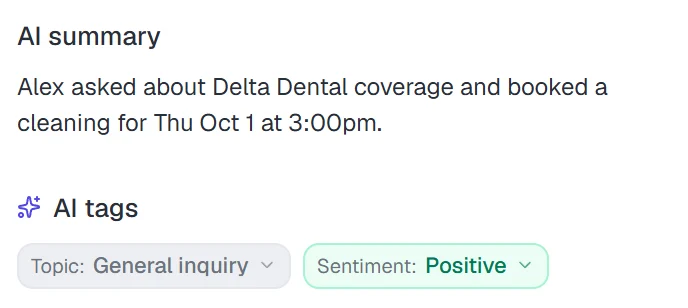
The tag reflects the most recent non-neutral reading, so it follows the conversation. A customer who started out annoyed and ends with "great, thank you" shows as positive by the end.
How does sentiment change what happens next?
A tag on its own is just information. The useful part is wiring it into routing. In Risolva, a handoff rule can include a Sentiment condition alongside topic, intent, channel, VIP status and business hours.
- Message arrivesTone read as angry
- Rule checkSentiment any of frustrated, angry
- HandoffConversation moves to Dana
- NotificationDana gets "Handoff routed to you"
Sentiment conditions are checked in real time, on every message, before the assistant replies. So the moment a conversation turns, the rule can step in. Here is how that looks from the customer's side:
 Fernwood HomeWhatsApp · example conversation
Routed to Dana R. · Upset customers rule
The handoff message the customer sees is yours to write, per rule or per bot. Our handoff playbook covers rule design in more detail.
Which escalation rules catch upset customers?
A few sentiment-based rules cover most teams:
- Send angry customers on any topic to whoever handles service recovery. These are the conversations most likely to turn into a public complaint.
- Send frustrated billing conversations to the person who can issue refunds, so the customer is not passed around twice.
- For a frustrated VIP, combine the Sentiment and VIP customer conditions in one rule and route it to the account owner. All conditions in a rule must match.
- Leave confused customers with the AI, which can rephrase and ask a clarifying question. If one topic keeps showing confused tags, the source document behind it probably needs rewriting.
Why not just let the AI decide when to escalate?
Risolva's assistant does escalate on its own when a customer asks for a person, stays upset after it has tried to help, or needs something it cannot do. Sentiment rules add something the AI's judgment cannot: your business decision about who handles what. The AI can tell that Megan is angry. Only you know that angry billing conversations should go to Dana and not the general queue.
Using sentiment to improve, not just react
Over a few weeks, the tags tell you where customers get upset. Filter the inbox by topic and look at which ones keep coming up frustrated. Often the fix has nothing to do with the bot: a delivery partner that is always late, or a returns policy written in a way that confuses people. Fix that and the frustrated tags drop on their own.
If you want to see sentiment tags and routing on your own conversations, book a demo and we will set it up on your docs.
Frequently asked questions
What is sentiment detection in customer support?
It is the AI reading the tone of each incoming message and labeling it, for example positive, confused, frustrated or angry, so your team and your routing rules can react to how the customer feels and not only to what they asked.
Which sentiments does Risolva detect?
Every message is classified as neutral, positive, confused, frustrated or angry. The latest non-neutral reading is shown as a tag on the conversation.
Can sentiment trigger a handoff to a person?
Yes. A handoff rule can use a Sentiment condition, such as "Sentiment any of frustrated, angry", and route matching conversations to a specific teammate or a group. Sentiment conditions are checked in real time, on every message.
What if the AI gets the sentiment wrong?
An agent can change the tag or dismiss it from the conversation panel. Once a person has set it, the AI does not overwrite their choice.
How should you reply to an angry customer in chat?
Acknowledge the problem in plain words, say what you're doing next and when, and skip canned replies. If an AI assistant is answering, the better move is usually to bring in a person quickly with the thread attached, which a sentiment rule can do as soon as an angry message arrives, before the AI replies.
Does sentiment detection work in other languages?
In Risolva, yes. Tone is read by the language model rather than matched against a word list, so a frustrated message in Spanish or French is tagged the same way as one in English.